Quick Answer
To unlock a PDF online securely, upload the locked file into our decryption tool, enter the correct owner password to verify authorization, click "Unlock PDF", and download the permanently password-free PDF document.
Are you tired of typing a complex password every single time you want to view your own bank statement, corporate invoice, or tax return? If you know the original password, you can easily unlock PDF online free and remove the encryption permanently so you never have to type it again.
Table of Contents
A reliable free pdf unlocker is essential for anyone dealing with highly secured documents. Whether you need to send files to an accountant or just want quick, frictionless access to your personal records locally, our PDF password remover strips away restrictions instantly without requiring you to install heavy software like Adobe Acrobat.
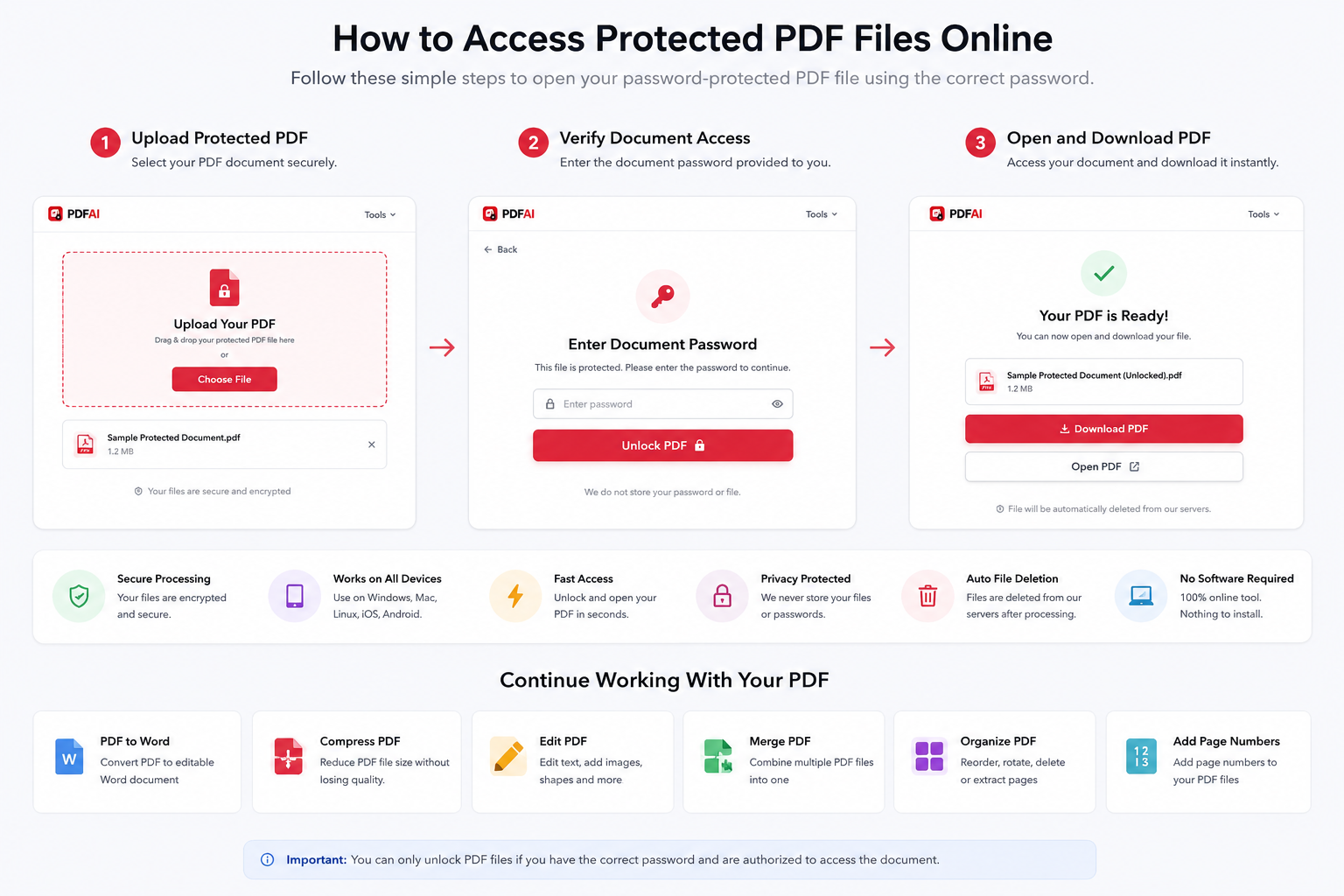
Upload your locked document, enter the current valid password, and download the permanently unlocked file.
What is a Password Protected PDF?
Before you remove password from PDF, it helps to clearly understand the two types of encryption used in modern document security:
- User Passwords (Open Passwords): This stops anyone from even opening or viewing the document without the correct cryptographic key. You must know this password to use our unlocker.
- Owner Passwords (Permissions): This allows anyone to open and read the document, but it strictly locks specific features like printing, editing, or copying text. Our tool helps you unlock secured PDF restrictions so you gain full administrative control of your file.
Why Users Remove PDF Passwords
While AES encryption is excellent when initially sending a document over email to a third party, it becomes a major hassle for long-term local storage. Here is why you should remove PDF password protection once the file is safely residing on your own device:
Safe Sharing
Send documents to your CA, lawyer, or local print shop without the massive security risk of sharing your personal passwords.
Instant Access
Open your own documents instantly on your phone or computer without searching for a complex combination every time.
Enable Editing
Locked PDFs disable printing, copying, and annotating. Unlocking them restores your ability to edit the file freely.
Future Archiving
Ensure you don't lose access to your important records 10 years from now just because you forgot an old password.
Comparison: Locked vs Unlocked PDF
Let's look at the functional capabilities you regain once you process your file through our decryption engine:
| Feature | Locked PDF | Unlocked PDF |
|---|---|---|
| Open Without Password | ||
| Edit & Annotate Content | ||
| Print Document | ||
| Share Easily with Third Parties |
How to Unlock PDF Online Free (Step-by-Step)
You can unlock PDF without Adobe right from your web browser. Here is the simple 3-step process to regain control of your files:
Security Notice & Legal Compliance
Authorization & Compliance
Please be aware: PDF AI is not a password cracking, brute-forcing, or hacking tool. You can only remove passwords from PDF files that you legally own or are explicitly authorized to access. Our system physically requires the input of the correct password before removing the protection layer to ensure complete legal and ethical compliance.
Unlock PDF vs Protect PDF
These two tools do the exact opposite but are equally critical in a professional document management workflow:
- Unlock PDF: Removes existing encryption. Use this when you have received a file from a bank and want to store it locally without the hassle of a password.
- Protect PDF: Adds new AES encryption. Use this when you are creating a confidential invoice or contract and want to ensure only the intended recipient can open it.
Enhance Your Workflow
Once you remove password from PDF, you regain full access to edit and format your document. With your newly unlocked file, you can:
Frequently Asked Questions (FAQ)
How do I unlock a PDF online?
Simply go to our free PDF Unlocker tool, upload your locked document, enter the current valid password to prove ownership, and click unlock. You can then download the permanently decrypted file.
Can I remove a PDF password permanently?
Yes. Our tool removes the 128-bit or 256-bit AES encryption layer from the file itself. Once you download the new file, it will never ask for a password again when opening, printing, or editing.
Is it safe to unlock PDF files online?
Yes, using PDF AI is highly secure. We use 256-bit SSL encryption during transfer and have a strict zero-data retention protocol. Your files and passwords are automatically removed after processing.
Can I unlock PDF on mobile?
Absolutely. Our PDF unlocker works natively in your web browser, meaning you can easily remove passwords from PDFs on your iPhone, iPad, or Android device without downloading an app.
Will unlocking a PDF affect its visual quality?
No. Removing the password only strips the encryption metadata. The text, images, layout, and overall visual quality of your document will remain 100% identical to the locked original.
Can I edit the PDF after removing the password?
Yes! Once the owner/permissions password is removed, all administrative restrictions are lifted. You can freely copy text, print the document, or use our PDF Editor tool to make modifications.
What if I completely forgot my PDF password?
If you do not know the user/open password, our tool cannot unlock the file. For legal and ethical security reasons, we do not provide brute-force password recovery services. You must know the password to strip it.
Is PDF AI free to use?
Yes, removing passwords with PDF AI is completely free. There are no hidden charges, no unexpected paywalls, and no mandatory account signups required to unlock your documents.
Tired of Locked Documents?
If you know the password, let us remove it permanently. Upload your file and regain full access to print, edit, and share your PDF instantly.