Split PDF Quick Answer
To split PDF pages online, upload your multi-page document into our free PDF splitter tool. Click on the visual thumbnails of the exact pages you want to extract or type a specific page range (e.g., 5-10). Click the "Split" button, and instantly download your new, smaller PDF containing only your selected pages.
The absolute easiest way to extract specific pages from a massive PDF document is to use an online PDF Splitter. By selecting only the pages you genuinely need, you can instantly generate a smaller, hyper-targeted file to share with clients or colleagues.
Table of Contents
Imagine receiving a 200-page corporate report via email, but your accountant only needs page 45 (the financial summary). Sending the entire massive file is not only a massive waste of bandwidth, but it creates confusion and severely risks exposing unrelated confidential information to the wrong party.
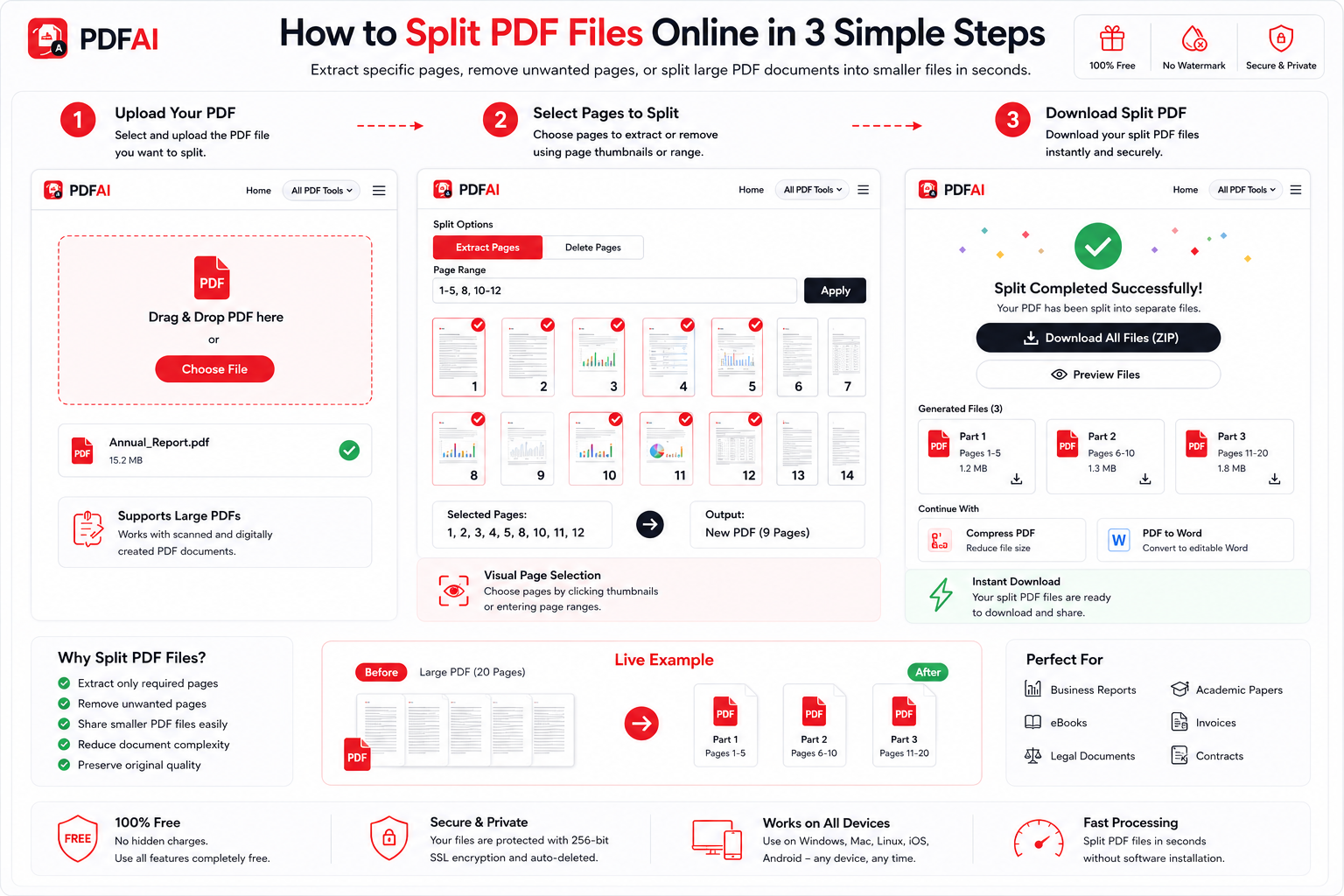
Easily extract exact pages, separate long chapters, or delete unnecessary sheets from your PDF in seconds.
See the Difference: Clutter vs. Clarity
Stop sending files that are too big for anyone to download or read comfortably on their phones. Extracted PDFs are highly effective and look professional:
Here is why utilizing a splitting tool is an essential part of modern document management:
Protect Privacy
Share only the relevant pages of a legal contract or invoice without revealing the rest of the sensitive document.
Reduce File Size
By extracting just a few pages, your document instantly becomes small enough to send via email or messaging apps like WhatsApp.
Organize Chaos
Break down massive e-books, instruction manuals, or scanned archives into smaller, easily digestible chapter-by-chapter files.
Zero Quality Loss
Our splitting engine extracts pages at a structural level, ensuring absolutely no loss in text clarity or original image resolution.
Split PDF vs Extract PDF: What's the Difference?
Many users get confused between the terms "Splitting" and "Extracting" a PDF, as they are often used interchangeably. However, depending on the tool you use, they can mean slightly different things. Here is a quick breakdown to help you understand what you need:
| Action | Split PDF | Extract Pages |
|---|---|---|
| Core Function | Divides one large PDF into multiple separate files. | Pulls specific pages out to create one new file. |
| Input Example | A 10-page document split into 10 single-page PDFs. | Selecting pages 2 and 5 from a 10-page document. |
| Final Output | Often delivered as a `.ZIP` file containing many PDFs. | Delivered as a single, smaller `.PDF` file. |
The great news? The PDF AI Split tool handles both functions seamlessly! You can choose to slice your document into multiple pieces or extract just a handful of pages into a new file.
Common Reasons to Split PDF Files
Why do thousands of users rely on our tool every day? Because modern digital workflows require speed and precision. Here are the most common scenarios:
Online PDF Splitter vs Desktop Software
Still using clunky, outdated desktop software to manage your PDFs? Let's compare the modern cloud approach with traditional software like Adobe Acrobat or offline readers.
| Feature | PDF AI (Online) | Desktop Software |
|---|---|---|
| Cost | ||
| Installation Required | ||
| Mobile Support (iOS/Android) | ||
| Instant Access |
How to Split a PDF Online (Step-by-Step)
You do not need to purchase expensive desktop software to perform this basic task. You can do it securely right in your browser:
Data Security & Privacy
What To Do After Splitting a PDF
Once you have extracted the exact pages you need, you might want to further optimize your new document. Check out our suite of free tools to perfect your workflow:
Frequently Asked Questions (FAQ)
Can I extract multiple non-consecutive pages?
Yes! You are not limited to a single continuous range. You can visually click on page 2, page 7, and page 15, and our tool will extract only those specific pages and combine them into a new document for you.
Is PDF splitting completely free?
Yes, the PDF AI Splitter is 100% free to use. There are no paywalls to extract pages, no daily limits, and we never add watermarks to your downloaded files.
Can I split a PDF on my mobile phone?
Absolutely. Our tool is web-based and highly responsive. You can open your iPhone or Android browser, upload a PDF from your files, tap the pages you want to extract, and download the new file directly to your phone.
Can I extract just one single page?
Yes. If you have a 100-page document and only want page 42, simply click the thumbnail for page 42 and hit extract. You will instantly get a 1-page PDF file.
Can I delete pages instead of extracting them?
Yes, extracting the pages you want to keep is essentially the same as deleting the ones you don't want. Just select the pages you wish to remain in the final document, and the unselected pages will be discarded.
Will splitting my PDF reduce its visual quality?
No. Splitting a PDF does not compress the file or alter its contents. It simply separates the internal structure. Your text will remain selectable and your images will retain their original high resolution.
Can I split a password-protected PDF?
If a PDF is locked with a viewing password, you must unlock it first. You can use our Unlock PDF tool to remove the password, and then proceed to split the unlocked file.
Is there a limit to how large the PDF can be?
Our free tier supports large files that cover the vast majority of standard office and personal documents. If you have a massive file spanning thousands of pages, the tool will still load visual thumbnails quickly for easy selection.
Ready to Cut Your PDF Down to Size?
Upload your file, select the exact pages you want to keep, and download them instantly. No watermarks, completely free.