Protect PDF Quick Answer
To protect a PDF with a password, upload your file to our free PDF encryption tool, enter a strong password, click 'Protect PDF', and download the encrypted version. Adding a password to a PDF prevents unauthorized access to confidential documents, ensuring your data remains secure.
Privacy is not a luxury; it is an absolute necessity. Whether you are dealing with sensitive bank statements, confidential business contracts, legal drafts, or official RTI applications, sending them unsecured over email or WhatsApp is a massive digital privacy risk.
Table of Contents
If your device gets compromised or an email is forwarded to the wrong person, your private data is instantly exposed to the public. The absolute best way to prevent this data leak? Lock your PDF document with a strong password. Using our free tool to password protect pdf online takes seconds but provides lasting peace of mind.
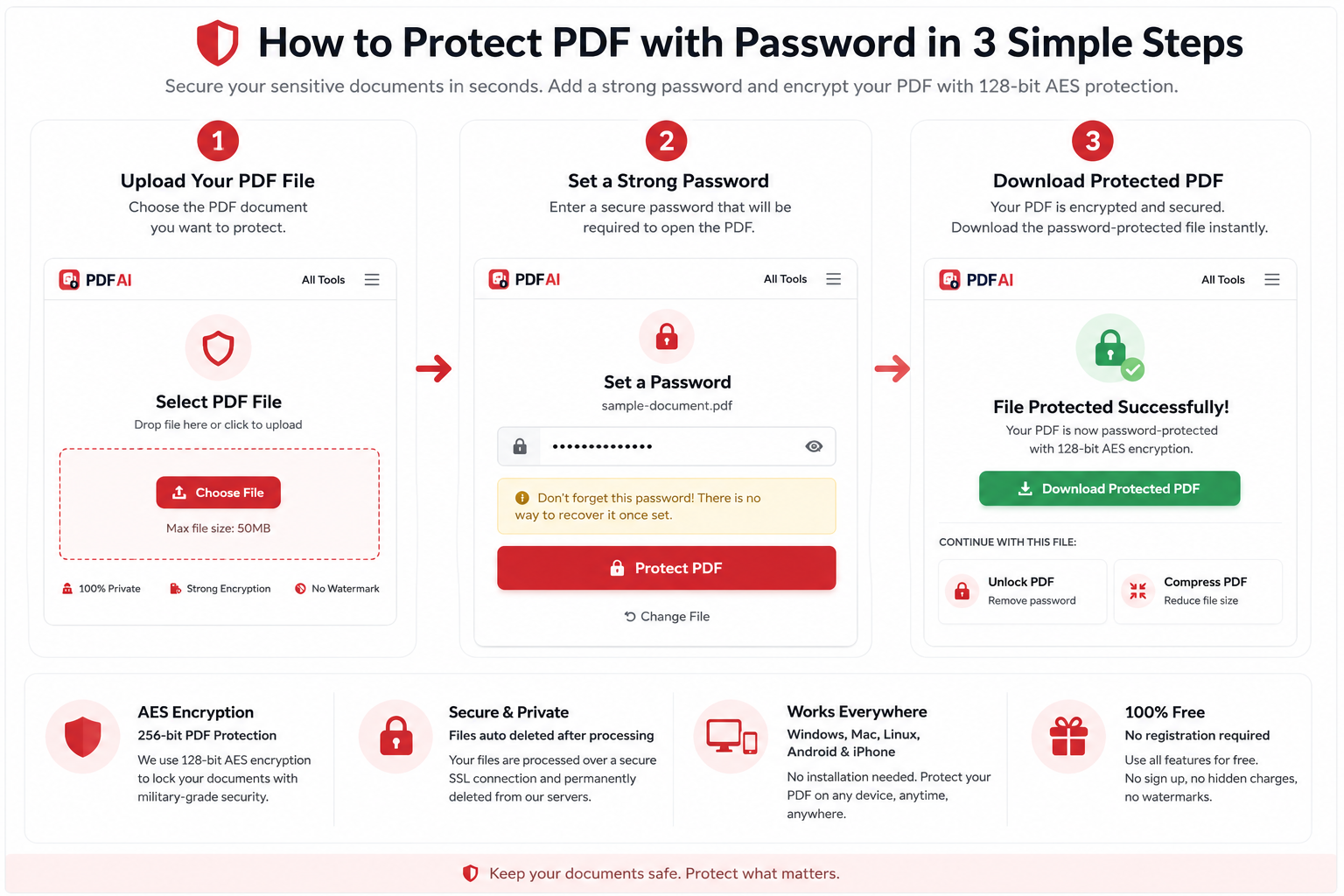
Step-by-step guide showing how to upload a PDF, create a secure password, encrypt the document with AES protection, and download the protected file.
Why You Must Encrypt Sensitive PDFs
Most people assume that because a file is saved on their personal computer, it is secure. Unfortunately, that is far from the truth. When you add a password to a PDF, you create a barrier that protects you in various scenarios:
- Financial Security: Protect invoices, tax returns, and bank statements from identity theft.
- Legal Confidentiality: Ensure that legal notices and complaints are only read by the intended recipient.
- Peace of Mind: Even if a hacker intercepts your file, they cannot open it without the cryptographic key.
What Is PDF Encryption?
When you use a PDF encryption tool, the software doesn't just put a visual lock icon over your text. It physically scrambles the data inside the file using complex mathematical algorithms.
PDF AI utilizes AES (Advanced Encryption Standard), which is the global gold standard for digital security. Depending on the setting, we use up to 256-bit AES encryption. To put that into perspective, it would take modern supercomputers billions of years to crack a 256-bit encryption key by brute force. Once you encrypt pdf online, the data inside becomes completely unreadable until the correct password unlocks and unscrambles it.
Documents That Should Always Be Password Protected
Not every file needs a password, but certain documents carry severe consequences if leaked. Always use a secure pdf file strategy for the following:
Normal PDF vs Protected PDF
Let's look at the functional difference between leaving your file exposed versus taking 30 seconds to lock it:
| Feature | Normal PDF | Protected PDF |
|---|---|---|
| Openable by Anyone | ||
| Data Security Level | ||
| Email Safe | ||
| Content Scraping |
How to Create a Strong PDF Password
Encryption is only as strong as the password you create. If you use a simple password, hackers can easily guess it. Here is how to create a highly secure lock key:
❌ Weak Passwords (Avoid These):
123456(Easily guessed by bots)password(The most common password in the world)admin123(Standard default, highly vulnerable)yourname2026(Too personal and predictable)
✅ Strong Passwords (Use These):
Ragib@2026#PDF(Mix of name, symbol, number)Hk9$mP2!qL(Completely random string)Blue$Tiger99!(Passphrase with symbols)
Rule of thumb: Always mix uppercase letters, lowercase letters, numbers, and special symbols (!@#$%).
Lock your document right now
Use our free PDF protection tool to add an encrypted password. We guarantee enhanced security for all your files.
Protect PDF NowHow to Password Protect a PDF in 3 Steps
Enhance Your Security Workflow
Now that your document is safely locked, you might want to optimize it further for sharing. Explore our other free utilities:
Frequently Asked Questions (FAQ)
Can I remove the PDF password later?
Yes! If you ever want to remove the encryption permanently, you can use our Unlock PDF tool. You will simply need to enter the correct password one last time to strip the security layer.
Is PDF password protection truly secure?
Yes, when you password protect pdf free using PDF AI, we apply industry-standard AES encryption. As long as you choose a complex password, your file is incredibly secure against brute-force attacks.
Can I protect PDFs on my mobile phone?
Absolutely. PDF AI is completely web-based. You can open your browser on iOS or Android, upload your document, set your password, and download the locked file directly to your phone.
What exact encryption is used by this tool?
Our tool utilizes Advanced Encryption Standard (AES), employing up to 256-bit encryption depending on the PDF version. This is the exact same cryptographic standard used by banks and governments globally.
Is the PDF protection tool free to use?
Yes, adding a password to your document is 100% free on PDF AI. There are no hidden fees, subscriptions, or watermarks added to your final encrypted document.
What happens if I forget the password?
Because we do not store your passwords or your files, if you forget your password, the document cannot be recovered or unlocked by us. Always keep a secure backup of your passwords.
Can I password protect very large PDF files?
Yes, our free tier supports large files, such as heavy legal bundles or extended medical records. The encryption algorithm runs quickly regardless of the document's total page count.
Does password protection affect the PDF quality?
No. Encrypting a file does not compress its contents or reduce the resolution of images. It strictly adds a mathematical security layer over the exact original data.