PDF to Word Quick Answer
To convert PDF to Word online, upload your PDF document to the PDF AI converter tool, wait a few seconds for the AI to extract text, tables, and images, and download your fully editable DOCX file. Our free PDF to Word converter maintains your original formatting without adding any watermarks.
We all know the frustration. You receive a contract, a resume template, or a detailed report in PDF format, but you spot a glaring spelling mistake or need to update critical figures. Because PDFs are explicitly designed to lock content in place for printing, you can't simply click your mouse and start typing.
Instead of wasting hours manually retyping an entire document from scratch, the smartest solution is to use an advanced PDF to Word converter. By doing so, you can instantly turn rigid PDF files into fully editable Microsoft Word documents (DOCX). The main challenge? Most free tools completely destroy the formatting, misplace images, or ruin your file with ugly watermarks.
Table of Contents
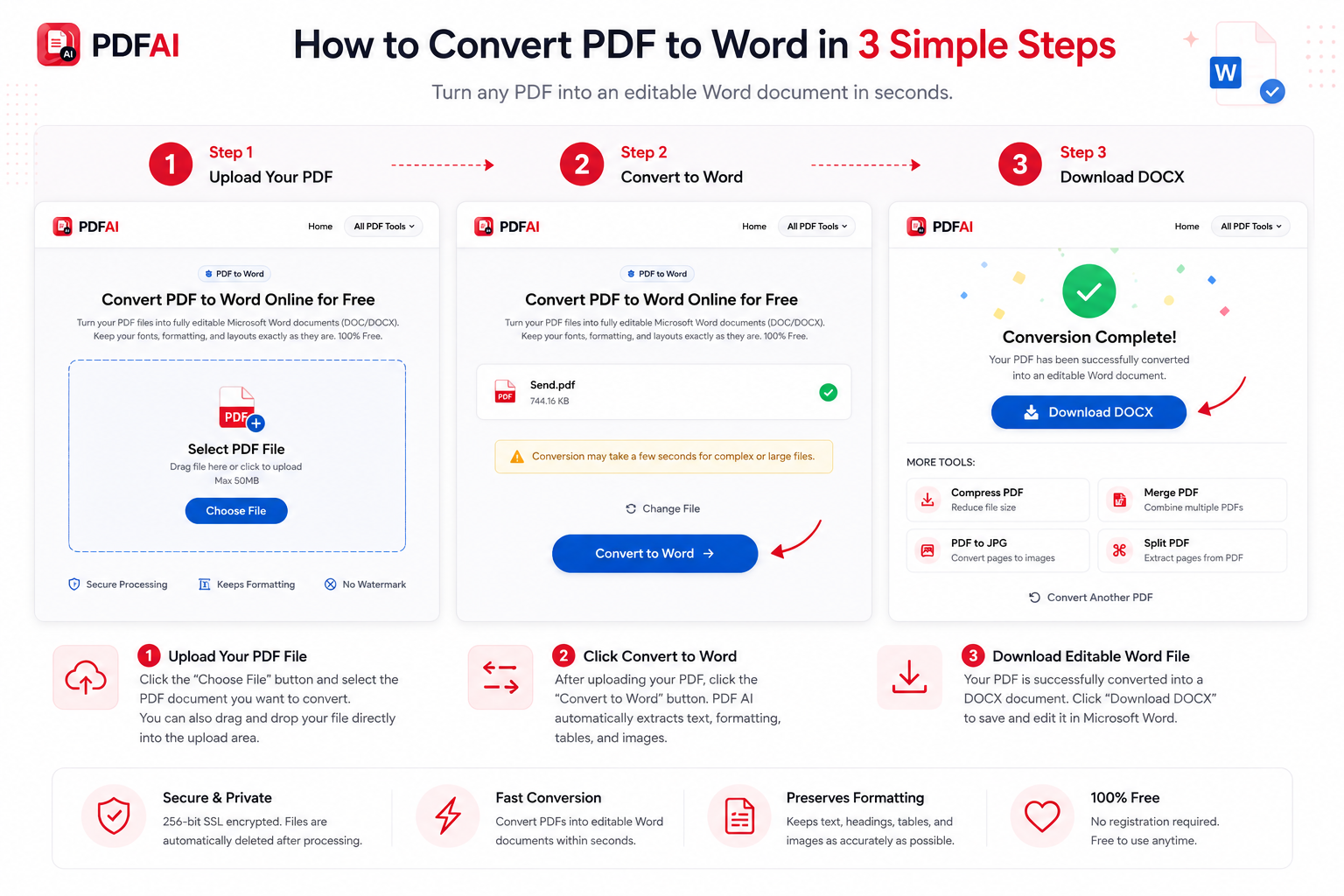
Step-by-step guide showing how to securely upload a PDF, convert it to Word, and download the editable DOCX file using PDF AI.
Why Convert PDF to Word? (Format Retention Matters)
When you attempt to copy and paste text directly from a PDF reader into a Word processor, it usually results in broken lines, weird spacing, and lost fonts. A dedicated converter ensures accuracy.
- Save Hours of Time: A high-quality extraction engine keeps your tables, fonts, headers, and images exactly where they belong on the page.
- Resume Updates: Easily update older PDF resumes by turning them back into editable DOCX files to add your latest job experience.
- Zero Re-typing: Extract thousands of words instantly without missing a single character or punctuation mark.
- No Special Software: You don't need to buy expensive software like Adobe Acrobat Pro just to fix a typo.
The Magic of True Conversion
Here is what happens to your workflow when you use a high-quality online conversion engine instead of struggling with manual edits:
Need to edit your PDF right now?
Upload your file to PDF AI. We securely convert it to a Microsoft Word format in seconds, keeping your original layout completely intact.
Convert to Word NowCommon PDF to Word Use Cases
People across all industries rely on our tool to unlock their documents. Here are the most common scenarios where you need to change PDF to Word:
How to Convert PDF to Word Online (Step-by-Step)
Converting PDF files into editable Word documents is effortless with PDF AI. You don't need to install any heavy software on your computer. Just follow these steps:
Why PDF AI vs Other Generic Tools?
If you search for a converter online, you will find hundreds of results. However, PDF AI is explicitly built to be a professional-grade, privacy-first utility. Here is how we compare:
| Feature | PDF AI Converter | Generic Free Tools |
|---|---|---|
| Formatting Retention | ||
| 100% Free | ||
| No Watermarks Added | ||
| Auto-Deletion Security |
Explore More Document Tools
PDF AI is your ultimate document management hub. Beyond converting files to Word, explore our other free, high-speed utilities:
Frequently Asked Questions (FAQ)
Is the PDF to Word converter free?
Yes! Our PDF to Word converter is 100% free to use. There are no hidden subscription fees, and we never place annoying watermarks on your downloaded Word documents.
Does the formatting stay intact after conversion?
Yes. We use advanced layout-reconstruction technology to ensure that paragraphs, bullet points, tables, and images remain in their correct positions inside the new DOCX file.
Can I convert scanned PDFs to Word?
Currently, our tool converts standard text-based PDFs exceptionally well. For heavily scanned documents (which are essentially flat images), you will get the document in Word, but the text might remain as an image block unless an OCR tool is applied.
Can I use this tool on my iPhone or Android?
Absolutely. PDF AI is completely web-based. You can upload a PDF directly from your mobile phone's storage or cloud drive and download the editable Word file straight to your device.
Is my file secure during the process?
Your privacy is our top priority. We use 256-bit secure SSL encryption for all file transfers. Furthermore, any document you upload—and the resulting Word file—is permanently deleted from our servers immediately after the conversion is complete.
Can I edit the DOCX after conversion?
Yes, that is the whole point! Once you download the DOCX file, you can open it in Microsoft Word, Google Docs, Apple Pages, or LibreOffice and edit every single word, delete images, or add new pages.