Organize PDF Quick Answer
To organize PDF pages online, upload your document into the PDF AI Organizer tool. Once uploaded, you will see visual thumbnails of every page. Simply click and drag and drop PDF pages to rearrange or reorder them. You can also click the trash icon to delete PDF pages. When finished, hit 'Save' to download your sorted document instantly.
The fastest way to fix a messy document is by using a visual PDF Organizer. Whether you need to rearrange PDF pages, sort a massive report, or delete blank sheets, simply dragging and dropping page thumbnails allows you to clean up files instantly without rescanning physical papers.
Table of Contents
We've all experienced this frustrating scenario: you scan a 10-page contract, and somehow, page 4 ends up at the very end, and there's a blurry duplicate of page 2 right in the middle. Sending a disorganized document to a client, teacher, or boss looks highly unprofessional and causes unnecessary confusion.
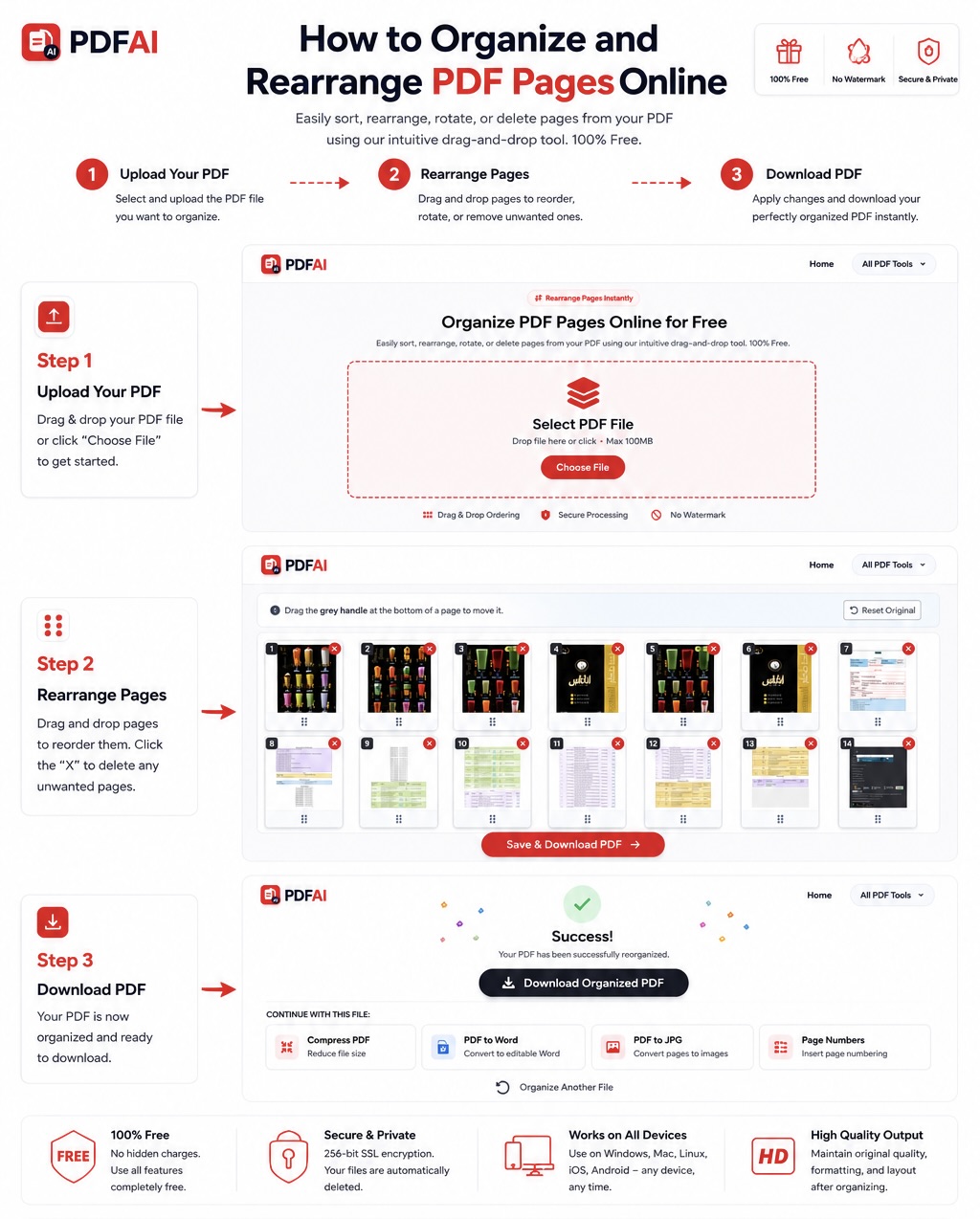
Easily drag, drop, and delete pages to create a perfectly structured PDF document.
What Can a PDF Organizer Do?
A dedicated tool to sort PDF pages online is much more than just a reordering feature. Using our completely free web-based suite, you gain full structural control over your file. With PDF AI, you can:
- Move Pages in PDF: Seamlessly drag any page from the back of a document to the front.
- Delete PDF Pages: Remove blurry scans, duplicate copies, or unnecessary cover pages.
- Rotate Pages: If a scanned page is upside down, quickly rotate it 90 or 180 degrees.
- Clean Blank Pages: Spot and eliminate empty pages that bloat file sizes.
See the Difference: Chaos vs. Order
Here is what happens when you decide to professionally reorder PDF pages online before sending an email:
Why does taking 30 seconds to clean up your file matter so much?
Professional Presentation
A well-ordered document shows that you pay attention to detail and respect the reader's time.
Remove Mistakes
Easily select and delete blank pages, blurry scans, or duplicate pages without ruining the rest of the file.
Save Huge Time
Fixing a PDF digitally takes 30 seconds compared to finding the original papers and re-scanning everything.
Maintain Structure
Sorting pages updates the document's internal metadata, so the new page order is saved permanently.
When Should You Reorder PDF Pages?
There are countless scenarios where files get jumbled. Here are the most common reasons users visit PDF AI to restructure their documents:
Organize PDF vs Split PDF: What's the Difference?
Many users confuse organizing a document with splitting one. While both tools manage pages, they serve entirely different purposes. Here is a quick breakdown to help you choose the right tool for your specific task:
| Action / Feature | Organize PDF Tool | Split PDF Tool |
|---|---|---|
| Core Function | ||
| Final Output | One single PDF with a new layout. | Multiple PDFs or a new extracted file. |
| Best Used For | Fixing a bad scan or deleting blanks. | Sending just Chapter 1 of a massive book. |
If you need to break a file apart, use our Split PDF tool. If you want to keep the file whole but fix the sequence, keep reading!
How to Sort PDF Pages in 3 Simple Steps
You don't need to install complicated software. You can safely organize scanned PDF files directly from your browser:
Data Security & Privacy
What To Do After Organizing a PDF
Once you have deleted the blank pages and moved everything into the perfect sequence, you might want to finalize your document using our other free tools:
Frequently Asked Questions (FAQ)
Can I organize PDFs on my mobile phone?
Yes! Our PDF AI Organizer is completely responsive. You can open it on Safari or Chrome on your iPhone or Android, upload a document, and easily drag and drop pages using your touchscreen.
Can I rotate pages while organizing?
Absolutely. If you spot a page that was scanned upside down while organizing your file, you can use our Rotate tool to flip it 90 or 180 degrees before saving the final document.
Can I delete multiple blank pages at once?
Yes! While you are in the visual thumbnail view, you can easily identify and delete unwanted, blank, or duplicate pages simply by clicking the trash can icon on each useless page before saving.
Can I undo page changes if I make a mistake?
While in the editor view, you can drag and drop pages as many times as you want until the order is perfect. The actual file is not modified until you click the final "Apply Changes" button.
Will changing the order ruin my formatting?
No. Our tool safely modifies the PDF metadata without touching the content of the pages themselves. The text, fonts, images, and formatting on each individual page will remain exactly the same.
Is it completely free to sort pages?
Yes, organizing, rearranging, and deleting pages is a core feature of PDF AI that is 100% free to use. There are no paywalls, software installations, or watermarks added to your file.
Can I organize a password-protected PDF?
If a document has a viewing restriction or edit lock, you must remove it first. You can use our Unlock PDF tool to strip the password, and then organize the unlocked file.
What is the maximum file size allowed?
Our free tier accommodates very large files, allowing you to upload and organize documents with hundreds of pages smoothly. The visual thumbnails will generate quickly regardless of the file size.
Fix Your Document Layout Now
Upload your messy PDF, drag pages to reorder them, delete the junk, and download a professional file instantly.